MySQL 8.4 Release Notes
每当需要复制的更改发生时,群组都需要达成共识。对于常规事务来说是如此,对于群组成员的变更以及一些保持群组一致性的内部消息传递也是如此。共识要求大多数群组成员对某一决策达成一致。当大多数群组成员丧失时,群组无法继续进行并会阻塞,因为它无法获得多数或法定人数。The group needs to achieve consensus whenever a change that needs to be replicated happens. This is the case for regular transactions but is also required for group membership changes and some internal messaging that keeps the group consistent. Consensus requires a majority of group members to agree on a given decision. When a majority of group members is lost, the group is unable to progress and blocks because it cannot secure majority or quorum.
当发生多次非自愿故障,导致大多数服务器被突然从群组中移除时,可能会失去法定人数。例如,在一个拥有 5 台服务器的群组中,如果其中 3 台同时失效,则多数已被破坏,从而无法获得法定人数。实际上,剩下的两台服务器无法判断其他 3 台服务器是崩溃了还是网络分区导致它们仅与这两台隔离,因此群组无法自动重新配置。Quorum may be lost when there are multiple involuntary failures, causing a majority of servers to be removed abruptly from the group. For example, in a group of 5 servers, if 3 of them become silent at once, the majority is compromised and thus no quorum can be achieved. In fact, the remaining two are not able to tell if the other 3 servers have crashed or whether a network partition has isolated these 2 alone and therefore the group cannot be reconfigured automatically.
另一方面,如果服务器自愿退出组,它们会指示组重新配置 itself。实际上,这意味着正在离开的服务器会告诉其他服务器它要离开。这意味着其他成员可以适当地重新配置组,成员的一致性得以保持,并重新计算多数。例如,在上述 5 台服务器的场景中,如果 3 台服务器同时离开,如果这 3 台要离开的服务器一个接一个地警告组它们即将离开,那么成员能够将组从 5 调整到 2,同时在此过程中确保法定人数。On the other hand, if servers exit the group voluntarily, they instruct the group that it should reconfigure itself. In practice, this means that a server that is leaving tells others that it is going away. This means that other members can reconfigure the group properly, the consistency of the membership is maintained and the majority is recalculated. For example, in the above scenario of 5 servers where 3 leave at once, if the 3 leaving servers warn the group that they are leaving, one by one, then the membership is able to adjust itself from 5 to 2, and at the same time, securing quorum while that happens.
Note
多数丧失本身是糟糕计划的副作用。根据预期的故障数量来规划组的大小(无论这些故障是连续发生、一次性发生还是零散发生)。Loss of quorum is by itself a side-effect of bad planning. Plan the group size for the number of expected failures (regardless whether they are consecutive, happen all at once or are sporadic).
对于处于单主模式的组,在网络分区时,主节点可能会有其他成员尚未接收到的事务。如果您考虑从新组中排除主节点,请注意这些事务可能会丢失。拥有额外事务的成员无法重新加入组,尝试加入会导致错误,错误信息为 此成员执行的事务数量多于组中存在的事务。为组成员设置 group_replication_unreachable_majority_timeout 系统变量,以避免这种情况。For a group in single-primary mode, the primary might have
transactions that are not yet present on other members at the time
of the network partition. If you are considering excluding the
primary from the new group, be aware that such transactions might
be lost. A member with extra transactions cannot rejoin the group,
and the attempt results in an error with the message
This member has more executed transactions than those
present in the group. Set the
group_replication_unreachable_majority_timeout
system variable for the group members to avoid this situation.
以下各节解释了如果系统发生分区而组中的服务器未能自动达到法定人数时应如何处理。The following sections explain what to do if the system partitions in such a way that no quorum is automatically achieved by the servers in the group.
replication_group_members 性能模式表从本服务器的角度显示当前视图中每个服务器的状态。大多数情况下,系统不会遇到分区问题,因此该表显示的信息在组中的所有服务器之间保持一致。换句话说,该表中每个服务器的状态在当前视图中是所有服务器一致认可的。但是,如果发生网络分区并且失去法定人数,则该表会显示无法联系的服务器状态为 UNREACHABLE。这些信息由内置于组复制的本地故障检测器导出。The replication_group_members
performance schema table presents the status of each server in
the current view from the perspective of this server. The
majority of the time the system does not run into partitioning,
and therefore the table shows information that is consistent
across all servers in the group. In other words, the status of
each server on this table is agreed by all in the current view.
However, if there is network partitioning, and quorum is lost,
then the table shows the status UNREACHABLE
for those servers that it cannot contact. This information is
exported by the local failure detector built into Group
Replication.
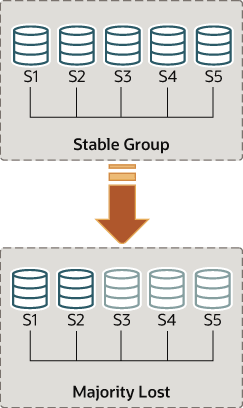
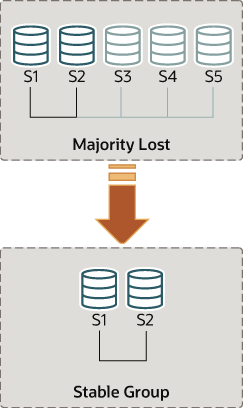
为了理解这种类型的网络分区,下面的部分描述了一个场景:最初有 5 台服务器正常协作,然后当只有 2 台服务器在线时,组中发生的变化。该场景如图所示。To understand this type of network partition the following section describes a scenario where there are initially 5 servers working together correctly, and the changes that then happen to the group once only 2 servers are online. The scenario is depicted in the figure.
因此,假设存在一个包含以下 5 台服务器的组:As such, lets assume that there is a group with these 5 servers in it:
服务器 s1,成员标识符为
199b2df7-4aaf-11e6-bb16-28b2bd168d07Server s1 with member identifier199b2df7-4aaf-11e6-bb16-28b2bd168d07服务器 s2,成员标识符为
199bb88e-4aaf-11e6-babe-28b2bd168d07Server s2 with member identifier199bb88e-4aaf-11e6-babe-28b2bd168d07服务器 s3,成员标识符为
1999b9fb-4aaf-11e6-bb54-28b2bd168d07Server s3 with member identifier1999b9fb-4aaf-11e6-bb54-28b2bd168d07服务器 s4,成员标识符为
19ab72fc-4aaf-11e6-bb51-28b2bd168d07Server s4 with member identifier19ab72fc-4aaf-11e6-bb51-28b2bd168d07服务器 s5,成员标识符为
19b33846-4aaf-11e6-ba81-28b2bd168d07Server s5 with member identifier19b33846-4aaf-11e6-ba81-28b2bd168d07
最初,组运行良好,服务器之间可以愉快地通信。您可以通过登录到 s1 并查看其 replication_group_members 性能模式表来验证这一点。例如:Initially the group is running fine and the servers are happily
communicating with each other. You can verify this by logging
into s1 and looking at its
replication_group_members
performance schema table. For example:
mysql> SELECT MEMBER_ID,MEMBER_STATE, MEMBER_ROLE FROM performance_schema.replication_group_members;
+--------------------------------------+--------------+-------------+
| MEMBER_ID                            | MEMBER_STATE | MEMBER_ROLE |
+--------------------------------------+--------------+-------------+
| 1999b9fb-4aaf-11e6-bb54-28b2bd168d07 | ONLINE       | SECONDARY   |
| 199b2df7-4aaf-11e6-bb16-28b2bd168d07 | ONLINE       | PRIMARY     |
| 199bb88e-4aaf-11e6-babe-28b2bd168d07 | ONLINE       | SECONDARY   |
| 19ab72fc-4aaf-11e6-bb51-28b2bd168d07 | ONLINE       | SECONDARY   |
| 19b33846-4aaf-11e6-ba81-28b2bd168d07 | ONLINE       | SECONDARY   |
+--------------------------------------+--------------+-------------+
然而,片刻之后发生了灾难性故障,服务器 s3、s4 和 s5 意外停止。几秒钟后,再次查看 s1 上的 replication_group_members 表显示它仍然在线,但其他一些成员不在线。实际上,如下所示,它们被标记为 UNREACHABLE。此外,系统无法重新配置自身以更改成员,因为已失去了多数成员。However, moments later there is a catastrophic failure and
servers s3, s4 and s5 stop unexpectedly. A few seconds after
this, looking again at the
replication_group_members table on
s1 shows that it is still online, but several others members are
not. In fact, as seen below they are marked as
UNREACHABLE. Moreover, the system could not
reconfigure itself to change the membership, because the
majority has been lost.
mysql> SELECT MEMBER_ID,MEMBER_STATE FROM performance_schema.replication_group_members;
+--------------------------------------+--------------+
| MEMBER_ID                            | MEMBER_STATE |
+--------------------------------------+--------------+
| 1999b9fb-4aaf-11e6-bb54-28b2bd168d07 | UNREACHABLE  |
| 199b2df7-4aaf-11e6-bb16-28b2bd168d07 | ONLINE       |
| 199bb88e-4aaf-11e6-babe-28b2bd168d07 | ONLINE       |
| 19ab72fc-4aaf-11e6-bb51-28b2bd168d07 | UNREACHABLE  |
| 19b33846-4aaf-11e6-ba81-28b2bd168d07 | UNREACHABLE  |
+--------------------------------------+--------------+
该表显示,s1 现在处于一个没有外部干预就无法进展的组中,因为大多数服务器无法访问。在这种特殊情况下,需要重置组成员列表以允许系统继续运行,具体说明见本节。或者,您还可以选择停止 s1 和 s2 上的组复制(或者完全停止 s1 和 s2),弄清 s3、s4 和 s5 的情况,然后重新启动组复制(或服务器)。The table shows that s1 is now in a group that has no means of progressing without external intervention, because a majority of the servers are unreachable. In this particular case, the group membership list needs to be reset to allow the system to proceed, which is explained in this section. Alternatively, you could also choose to stop Group Replication on s1 and s2 (or stop completely s1 and s2), figure out what happened with s3, s4 and s5 and then restart Group Replication (or the servers).
组复制使您能够通过强制特定配置来重置组成员列表。例如在上面的情况下,如果只有 s1 和 s2 处于在线状态,您可以选择强制一个仅包含 s1 和 s2 的成员配置。这需要检查有关 s1 和 s2 的一些信息,然后使用 group_replication_force_members 变量。Group replication enables you to reset the group membership list
by forcing a specific configuration. For instance in the case
above, where s1 and s2 are the only servers online, you could
choose to force a membership configuration consisting of only s1
and s2. This requires checking some information about s1 and s2
and then using the
group_replication_force_members
variable.
假设您回到 s1 和 s2 是组中仅存服务器的情况。服务器 s3、s4 和 s5 已意外离开组。为了让服务器 s1 和 s2 继续运行,您希望强制一个只包含 s1 和 s2 的成员配置。Suppose that you are back in the situation where s1 and s2 are the only servers left in the group. Servers s3, s4 and s5 have left the group unexpectedly. To make servers s1 and s2 continue, you want to force a membership configuration that contains only s1 and s2.
Warning
该过程使用了 group_replication_force_members,应被视为最后的补救措施。它 必须 非常小心地使用,仅用于覆盖法定人数丧失的情况。如果使用不当,可能会造成人为的脑裂场景或完全阻塞整个系统。This procedure uses
group_replication_force_members
and should be considered a last resort remedy. It
must be used with extreme care and only
for overriding loss of quorum. If misused, it could create an
artificial split-brain scenario or block the entire system
altogether.
在强制新的成员配置时,请确保任何将被强制移出组的服务器确实已停止。在上图所示的场景中,如果 s3、s4 和 s5 实际上并非无法访问而是在线,它们可能已经形成了自己的功能分区(它们是 5 个中的 3 个,因此占多数)。在这种情况下,强制使用 s1 和 s2 的组成员列表可能会导致人为的脑裂情况。因此,在强制新的成员配置之前,确保要排除的服务器确实已经关闭,如果没有,请在继续之前将其关闭。When forcing a new membership configuration, make sure that any servers are going to be forced out of the group are indeed stopped. In the scenario depicted above, if s3, s4 and s5 are not really unreachable but instead are online, they may have formed their own functional partition (they are 3 out of 5, hence they have the majority). In that case, forcing a group membership list with s1 and s2 could create an artificial split-brain situation. Therefore it is important before forcing a new membership configuration to ensure that the servers to be excluded are indeed shut down and if they are not, shut them down before proceeding.
Warning
对于处于单主模式的组,在网络分区时,主节点可能会有其他成员尚未接收到的事务。如果您考虑从新组中排除主节点,请注意这些事务可能会丢失。拥有额外事务的成员无法重新加入组,尝试加入会导致错误,错误信息为 此成员执行的事务数量多于组中存在的事务。为组成员设置 group_replication_unreachable_majority_timeout 系统变量,以避免这种情况。For a group in single-primary mode, the primary might have
transactions that are not yet present on other members at the
time of the network partition. If you are considering
excluding the primary from the new group, be aware that such
transactions might be lost. A member with extra transactions
cannot rejoin the group, and the attempt results in an error
with the message This member has more executed
transactions than those present in the group. Set
the
group_replication_unreachable_majority_timeout
system variable for the group members to avoid this situation.
请记住,系统被阻塞,当前配置如下(由 s1 上的本地故障检测器感知):Recall that the system is blocked and the current configuration is the following (as perceived by the local failure detector on s1):
mysql> SELECT MEMBER_ID,MEMBER_STATE FROM performance_schema.replication_group_members;
+--------------------------------------+--------------+
| MEMBER_ID                            | MEMBER_STATE |
+--------------------------------------+--------------+
| 1999b9fb-4aaf-11e6-bb54-28b2bd168d07 | UNREACHABLE  |
| 199b2df7-4aaf-11e6-bb16-28b2bd168d07 | ONLINE       |
| 199bb88e-4aaf-11e6-babe-28b2bd168d07 | ONLINE       |
| 19ab72fc-4aaf-11e6-bb51-28b2bd168d07 | UNREACHABLE  |
| 19b33846-4aaf-11e6-ba81-28b2bd168d07 | UNREACHABLE  |
+--------------------------------------+--------------+
首先要做的是检查 s1 和 s2 的本地地址(组通信标识符)是什么。登录 s1 和 s2,并按照以下方式获取该信息。The first thing to do is to check what is the local address (group communication identifier) for s1 and s2. Log in to s1 and s2 and get that information as follows.
mysql> SELECT @@group_replication_local_address;
一旦你知道 s1 (127.0.0.1:10000) 和 s2 (127.0.0.1:10001) 的组通信地址,你可以在其中一台服务器上使用这些地址注入一个新的成员配置,从而覆盖已经失去仲裁权的现有配置。在 s1 上操作的方法如下:Once you know the group communication addresses of s1
(127.0.0.1:10000) and s2
(127.0.0.1:10001), you can use that on one of
the two servers to inject a new membership configuration, thus
overriding the existing one that has lost quorum. To do that on
s1:
mysql> SET GLOBAL group_replication_force_members="127.0.0.1:10000,127.0.0.1:10001";
通过强制使用不同的配置,这可以解锁该组。请在 s1 和 s2 上检查 replication_group_members 表,以验证此更改后的组成员情况。首先在 s1 上检查。This unblocks the group by forcing a different configuration.
Check replication_group_members on
both s1 and s2 to verify the group membership after this change.
First on s1.
mysql> SELECT MEMBER_ID,MEMBER_STATE FROM performance_schema.replication_group_members;
+--------------------------------------+--------------+
| MEMBER_ID                            | MEMBER_STATE |
+--------------------------------------+--------------+
| b5ffe505-4ab6-11e6-b04b-28b2bd168d07 | ONLINE       |
| b60907e7-4ab6-11e6-afb7-28b2bd168d07 | ONLINE       |
+--------------------------------------+--------------+
然后在 s2 上检查。And then on s2.
mysql> SELECT * FROM performance_schema.replication_group_members;
+--------------------------------------+--------------+
| MEMBER_ID                            | MEMBER_STATE |
+--------------------------------------+--------------+
| b5ffe505-4ab6-11e6-b04b-28b2bd168d07 | ONLINE       |
| b60907e7-4ab6-11e6-afb7-28b2bd168d07 | ONLINE       |
+--------------------------------------+--------------+
在您使用 group_replication_force_members 系统变量成功强制新的群组成员并解除群组阻塞后,请确保清除该系统变量。group_replication_force_members 必须为空,才能执行 START
GROUP_REPLICATION 语句。After you have used the
group_replication_force_members
system variable to successfully force a new group membership and
unblock the group, ensure that you clear the system variable.
group_replication_force_members
must be empty in order to issue a START
GROUP_REPLICATION statement.