MySQL 8.4 Release Notes
- 25.3.1 在 Linux 上安装 NDB 集群25.3.1 Installation of NDB Cluster on Linux
- 25.3.2 在 Windows 上安装 NDB 集群25.3.2 Installing NDB Cluster on Windows
- 25.3.3 NDB 集群的初始配置25.3.3 Initial Configuration of NDB Cluster
- 25.3.4 NDB 集群的初次启动25.3.4 Initial Startup of NDB Cluster
- 25.3.5 带表和数据的 NDB 集群示例25.3.5 NDB Cluster Example with Tables and Data
- 25.3.6 NDB 集群的安全关闭和重启25.3.6 Safe Shutdown and Restart of NDB Cluster
- 25.3.7 NDB 集群的升级与降级25.3.7 Upgrading and Downgrading NDB Cluster
本节介绍了规划、安装、配置和运行 NDB 集群的基础知识。而 第 25.4 节,“NDB 集群的配置” 中的示例提供了关于各种集群选项和配置的更深入信息,按照此处概述的指南和步骤进行操作,应该能够得到一个符合 最低可用性和数据保护要求的可用 NDB 集群。This section describes the basics for planning, installing, configuring, and running an NDB Cluster. Whereas the examples in Section 25.4, “Configuration of NDB Cluster” provide more in-depth information on a variety of clustering options and configuration, the result of following the guidelines and procedures outlined here should be a usable NDB Cluster which meets the minimum requirements for availability and safeguarding of data.
有关在发布版本之间升级或降级 NDB 集群的信息,请参阅 第 25.3.7 节,“NDB 集群的升级和降级”。For information about upgrading or downgrading an NDB Cluster between release versions, see Section 25.3.7, “Upgrading and Downgrading NDB Cluster”.
本节涵盖硬件和软件要求;网络问题;NDB 集群的安装;基本配置问题;集群的启动、停止和重启;示例数据库的加载;以及执行查询。This section covers hardware and software requirements; networking issues; installation of NDB Cluster; basic configuration issues; starting, stopping, and restarting the cluster; loading of a sample database; and performing queries.
假设。 以下各节对集群的物理和网络配置做出了一些假设。这些假设将在接下来的几段中讨论。Assumptions. The following sections make a number of assumptions regarding the cluster's physical and network configuration. These assumptions are discussed in the next few paragraphs.
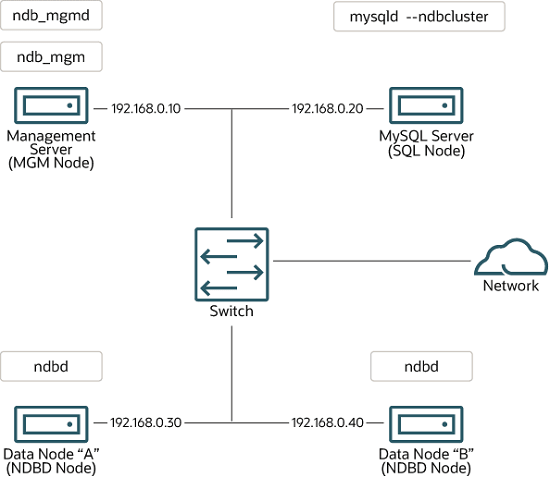
集群节点和主机计算机。 集群由四个节点组成,每个节点在一台独立的主机计算机上,并且每个节点在典型的以太网网络上具有固定的网络地址,如下所示:Cluster nodes and host computers. The cluster consists of four nodes, each on a separate host computer, and each with a fixed network address on a typical Ethernet network as shown here:
该设置也如下面的图所示:This setup is also shown in the following diagram:
网络地址。 为了简化(并提高可靠性),本操作指南仅使用数字 IP 地址。但是,如果您的网络上可用 DNS 解析,则可以在配置 Cluster 时使用主机名代替 IP 地址。或者,您可以使用 hosts 文件(在 Linux 及其他类 Unix 操作系统中通常为 /etc/hosts,在 Windows 中为 C:\WINDOWS\system32\drivers\etc\hosts,或使用您的操作系统的等效文件)来提供主机查找的方法(如果可用)。Network addressing.
In the interest of simplicity (and reliability), this
How-To uses only numeric IP addresses.
However, if DNS resolution is available on your network, it is
possible to use host names in lieu of IP addresses in configuring
Cluster. Alternatively, you can use the hosts
file (typically /etc/hosts for Linux and
other Unix-like operating systems,
C:\WINDOWS\system32\drivers\etc\hosts on
Windows, or your operating system's equivalent) for providing
a means to do host lookup if such is available.
NDB 8.4 支持所有 NDB Cluster 节点之间的 IPv6 连接。NDB 8.4 supports IPv6 for
connections between all NDB Cluster nodes.
Potential hosts file issues.
A common problem when trying to use host names for Cluster nodes
arises because of the way in which some operating systems
(including some Linux distributions) set up the system's own
host name in the /etc/hosts during
installation. Consider two machines with the host names
ndb1以及ndb2, both in the
cluster network domain. Red Hat Linux
(including some derivatives such as CentOS and Fedora) places the
following entries in these machines'
/etc/hosts files:Potential hosts file issues.
A common problem when trying to use host names for Cluster nodes
arises because of the way in which some operating systems
(including some Linux distributions) set up the system's own
host name in the /etc/hosts during
installation. Consider two machines with the host names
ndb1 and ndb2, both in the
cluster network domain. Red Hat Linux
(including some derivatives such as CentOS and Fedora) places the
following entries in these machines'
/etc/hosts files:
#  ndb1 /etc/hosts:
127.0.0.1   ndb1.cluster ndb1 localhost.localdomain localhost
#  ndb2 /etc/hosts:
127.0.0.1   ndb2.cluster ndb2 localhost.localdomain localhost
SUSE Linux(包括 OpenSUSE)会在这些机器的 /etc/hosts 文件中放置这些条目:SUSE Linux (including OpenSUSE) places these entries in the
machines' /etc/hosts files:
#  ndb1 /etc/hosts:
127.0.0.1       localhost
127.0.0.2       ndb1.cluster ndb1
#  ndb2 /etc/hosts:
127.0.0.1       localhost
127.0.0.2       ndb2.cluster ndb2
在这两种情况下,ndb1 将 ndb1.cluster 路由到回环 IP 地址,但从 DNS 获取 ndb2.cluster 的公共 IP 地址,而 ndb2 将 ndb2.cluster 路由到回环地址,并为 ndb1.cluster 获取公共地址。结果是每个数据节点都能连接到管理服务器,但无法判断其他数据节点何时已连接,因此数据节点在启动时似乎处于挂起状态。In both instances, ndb1 routes
ndb1.cluster to a loopback IP address, but gets a
public IP address from DNS for ndb2.cluster,
while ndb2 routes ndb2.cluster
to a loopback address and obtains a public address for
ndb1.cluster. The result is that each data node
connects to the management server, but cannot tell when any other
data nodes have connected, and so the data nodes appear to hang
while starting.
Caution
您不能在 config.ini 中混合使用 localhost 和其他主机名或 IP 地址。因此,在这种情况下的解决方案(除了对 所有 config.ini HostName 条目使用 IP 地址之外)是从 /etc/hosts 中删除完全限定的主机名,并在 config.ini 中对所有集群主机使用这些主机名。You cannot mix localhost and other host names
or IP addresses in config.ini. For these
reasons, the solution in such cases (other than to use IP
addresses for all
config.ini HostName
entries) is to remove the fully qualified host names from
/etc/hosts and use these in
config.ini for all cluster hosts.
主机类型。 我们安装场景中的每台主机都是基于 Intel 的台式电脑,运行已安装在磁盘上的支持操作系统,并以标准配置运行,不运行不必要的服务。具有标准 TCP/IP 网络功能的核心操作系统应该足够使用。此外,为了简化起见,我们还假设所有主机上的文件系统设置相同。如果实际情况不同,您应相应地调整这些说明。Host computer type. Each host computer in our installation scenario is an Intel-based desktop PC running a supported operating system installed to disk in a standard configuration, and running no unnecessary services. The core operating system with standard TCP/IP networking capabilities should be sufficient. Also for the sake of simplicity, we also assume that the file systems on all hosts are set up identically. In the event that they are not, you should adapt these instructions accordingly.
网络硬件。 每台机器上都安装了标准的 100 Mbps 或 1 千兆以太网卡,并安装了适用于网卡的驱动程序,且四台主机都通过标准以太网网络设备(如交换机)连接。(所有机器应使用相同吞吐量的网卡。也就是说,集群中的四台机器应全部配备 100 Mbps 网卡,或者全部配备 1 Gbps 网卡。)NDB Cluster 可以在 100 Mbps 网络中工作;然而,千兆以太网可提供更好的性能。Network hardware. Standard 100 Mbps or 1 gigabit Ethernet cards are installed on each machine, along with the proper drivers for the cards, and that all four hosts are connected through a standard-issue Ethernet networking appliance such as a switch. (All machines should use network cards with the same throughput. That is, all four machines in the cluster should have 100 Mbps cards or all four machines should have 1 Gbps cards.) NDB Cluster works in a 100 Mbps network; however, gigabit Ethernet provides better performance.
Important
NDB Cluster 不适用于吞吐量低于 100 Mbps 或延迟较高的网络。因此(以及其他原因),试图通过广域网(如互联网)运行 NDB Cluster 不太可能成功,并且在生产环境中不被支持。NDB Cluster is not intended for use in a network for which throughput is less than 100 Mbps or which experiences a high degree of latency. For this reason (among others), attempting to run an NDB Cluster over a wide area network such as the Internet is not likely to be successful, and is not supported in production.
示例数据。 我们使用 world 数据库,该数据库可以从 MySQL 网站下载(见 https://dev.mysql.com/doc/index-other.html)。我们假设每台机器都有足够的内存来运行操作系统、所需的 NDB Cluster 进程,并且在数据节点上存储数据库。Sample data.
We use the world database which is available
for download from the MySQL website (see
https://dev.mysql.com/doc/index-other.html). We assume that each
machine has sufficient memory for running the operating system,
required NDB Cluster processes, and (on the data nodes) storing
the database.
有关安装 MySQL 的一般信息,请参见 第 2 章,安装 MySQL。有关在 Linux 及其他类 Unix 操作系统上安装 NDB Cluster 的信息,请参见 第 25.3.1 节,“在 Linux 上安装 NDB Cluster”。有关在 Windows 操作系统上安装 NDB Cluster 的信息,请参见 第 25.3.2 节,“在 Windows 上安装 NDB Cluster”。For general information about installing MySQL, see Chapter 2, Installing MySQL. For information about installation of NDB Cluster on Linux and other Unix-like operating systems, see Section 25.3.1, “Installation of NDB Cluster on Linux”. For information about installation of NDB Cluster on Windows operating systems, see Section 25.3.2, “Installing NDB Cluster on Windows”.
有关 NDB 集群硬件、软件和网络要求的一般信息,请参阅 第 25.2.3 节,“NDB 集群硬件、软件和网络要求”。For general information about NDB Cluster hardware, software, and networking requirements, see Section 25.2.3, “NDB Cluster Hardware, Software, and Networking Requirements”.