MySQL 8.4 Release Notes
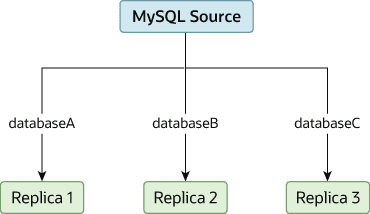
可能会出现这样一种情况:你只有一个源服务器,但希望将不同的数据库复制到不同的副本。例如,你可能希望将不同的销售数据分发到不同的部门,以帮助在数据分析过程中分担负载。该布局的示例显示在图 19.2,“将数据库复制到不同副本”。There may be situations where you have a single source server and want to replicate different databases to different replicas. For example, you may want to distribute different sales data to different departments to help spread the load during data analysis. A sample of this layout is shown in Figure 19.2, “Replicating Databases to Separate Replicas”.
您可以通过将源和副本按常规进行配置,然后使用每个副本的--replicate-wild-do-table配置选项限制每个副本处理的二进制日志语句,从而实现这种分离。You can achieve this separation by configuring the source and
replicas as normal, and then limiting the binary log statements
that each replica processes by using the
--replicate-wild-do-table
configuration option on each replica.
Important
在使用基于语句的复制时,您不应该为了这个目的使用--replicate-do-db,因为基于语句的复制会导致该选项的效果根据当前选择的数据库而不同。这同样适用于混合格式复制,因为这会使一些更新使用基于语句的格式进行复制。You should not use
--replicate-do-db for this
purpose when using statement-based replication, since
statement-based replication causes this option's effects to
vary according to the database that is currently selected. This
applies to mixed-format replication as well, since this enables
some updates to be replicated using the statement-based format.
不过,如果您仅使用基于行的复制,那么为了这个目的使用 --replicate-do-db 应该是安全的,因为在这种情况下,当前选择的数据库对该选项的操作没有影响。However, it should be safe to use
--replicate-do-db for this
purpose if you are using row-based replication only, since in
this case the currently selected database has no effect on the
option's operation.
例如,为了支持如 图 19.2,“将数据库复制到不同副本” 所示的分离,在执行 START REPLICA 之前,您应该按如下方式配置每个副本:For example, to support the separation as shown in
Figure 19.2, “Replicating Databases to Separate Replicas”, you should
configure each replica as follows, before executing
START REPLICA:
副本 1 应使用
--replicate-wild-do-table=databaseA.%。Replica 1 should use--replicate-wild-do-table=databaseA.%.副本 2 应使用
--replicate-wild-do-table=databaseB.%。Replica 2 should use--replicate-wild-do-table=databaseB.%.副本 3 应使用
--replicate-wild-do-table=databaseC.%。Replica 3 should use--replicate-wild-do-table=databaseC.%.
在此配置中,每个副本都会接收来自源的整个二进制日志,但只执行二进制日志中适用于该副本 --replicate-wild-do-table 选项包含的数据库和表的事件。Each replica in this configuration receives the entire binary log
from the source, but executes only those events from the binary
log that apply to the databases and tables included by the
--replicate-wild-do-table option in
effect on that replica.
如果您有必须在复制开始前同步到副本的数据,您有几种选择:If you have data that must be synchronized to the replicas before replication starts, you have a number of choices:
将所有数据同步到每个副本,并删除您不想保留的数据库、表或两者。Synchronize all the data to each replica, and delete the databases, tables, or both that you do not want to keep.
使用 mysqldump 为每个数据库创建单独的转储文件,并在每个副本上加载相应的转储文件。Use mysqldump to create a separate dump file for each database and load the appropriate dump file on each replica.
使用原始数据文件转储,并仅包含每个副本所需的特定文件和数据库。Use a raw data file dump and include only the specific files and databases that you need for each replica.
Note除非使用
innodb_file_per_table,否则这对InnoDB数据库不起作用。This does not work withInnoDBdatabases unless you useinnodb_file_per_table.