MySQL 8.4 Release Notes
ndb_top 在终端中显示 NDB Cluster 数据节点上 NDB 线程的 CPU 使用情况。输出中每个线程用两行表示,第一行显示系统统计信息,第二行显示该线程的测量统计信息。ndb_top displays running information in the terminal about CPU usage by NDB threads on an NDB Cluster data node. Each thread is represented by two rows in the output, the first showing system statistics, the second showing the measured statistics for the thread.
ndb_top 自 MySQL NDB Cluster 7.6.3 起可用。ndb_top is available beginning with MySQL NDB Cluster 7.6.3.
用法Usage
ndb_top [-hhostname] [-tport] [-uuser] [-ppass] [-nnode_id]
ndb_top 连接到作为集群 SQL 节点运行的 MySQL 服务器。默认情况下,它尝试以 MySQL root 用户(未指定密码)连接到在 localhost 和端口 3306 上运行的 mysqld。您可以分别使用 --host (-h) 和 --port (-t) 覆盖默认的主机和端口。要指定 MySQL 用户和密码,请使用 --user (-u) 和 --passwd (-p) 选项。此用户必须能够读取 ndbinfo 数据库中的表格 (ndb_top 使用 ndbinfo.cpustat 及相关表的信息)。ndb_top connects to a MySQL Server running as
an SQL node of the cluster. By default, it attempts to connect
to a mysqld running on
localhost and port 3306, as the MySQL
root user with no password specified. You can
override the default host and port using, respectively,
--host (-h) and
--port (-t). To
specify a MySQL user and password, use the
--user (-u) and
--passwd (-p)
options. This user must be able to read tables in the
ndbinfo database
(ndb_top uses information from
ndbinfo.cpustat and related
tables).
有关 MySQL 用户账户和密码的更多信息,请参阅 第 8.2 节,“访问控制和账户管理”。For more information about MySQL user accounts and passwords, see Section 8.2, “Access Control and Account Management”.
输出可以以纯文本或 ASCII 图的形式显示;您可以分别使用 --text (-x) 和 --graph (-g) 选项指定。这两种显示模式提供相同的信息;它们可以同时使用。必须至少使用一种显示模式。Output is available as plain text or an ASCII graph; you can
specify this using the --text
(-x) and
--graph (-g)
options, respectively. These two display modes provide the same
information; they can be used concurrently. At least one display
mode must be in use.
图表的彩色显示是支持的,并且默认启用(--color 或 -c 选项)。启用彩色支持后,图表显示中操作系统用户时间为蓝色,操作系统系统时间为绿色,空闲时间显示为空白。对于测量负载,蓝色用于执行时间,黄色用于发送时间,红色用于发送缓冲区已满等待的时间,空白用于空闲时间。图表显示的百分比是所有非空闲线程百分比的总和。颜色当前不可配置;你可以使用 --skip-color 改为使用灰度显示。Color display of the graph is supported and enabled by default
(--color or -c
option). With color support enabled, the graph display shows OS
user time in blue, OS system time in green, and idle time as
blank. For measured load, blue is used for execution time,
yellow for send time, red for time spent in send buffer full
waits, and blank spaces for idle time. The percentage shown in
the graph display is the sum of percentages for all threads
which are not idle. Colors are not currently configurable; you
can use grayscale instead by using
--skip-color.
排序视图(--sort,-r)基于测量负载和操作系统报告负载的最大值。这些的显示可以通过--measured-load(-m)和--os-load(-o)选项启用或禁用。必须启用至少一种负载的显示。The sorted view (--sort,
-r) is based on the maximum of the measured
load and the load reported by the OS. Display of these can be
enabled and disabled using the
--measured-load
(-m) and
--os-load (-o)
options. Display of at least one of these loads must be enabled.
该程序尝试从具有 --node-id (-n) 选项指定的节点 ID 的数据节点获取统计信息;如果未指定,则默认为 1。 ndb_top 无法提供其他类型节点的信息。The program tries to obtain statistics from a data node having
the node ID given by the
--node-id (-n)
option; if unspecified, this is 1. ndb_top
cannot provide information about other types of nodes.
视图会根据终端窗口的高度和宽度自动调整;支持的最小宽度为 76 个字符。The view adjusts itself to the height and width of the terminal window; the minimum supported width is 76 characters.
一旦启动,ndb_top 将持续运行,直到被强制退出;你可以使用 Ctrl-C 退出程序。显示每秒更新一次;要设置不同的延迟间隔,请使用 --sleep-time (-s)。Once started, ndb_top runs continuously until
forced to exit; you can quit the program using
Ctrl-C. The display updates once per second;
to set a different delay interval, use
--sleep-time
(-s).
Note
ndb_top 可在 macOS、Linux 和 Solaris 上使用。目前不支持 Windows 平台。ndb_top is available on macOS, Linux, and Solaris. It is not currently supported on Windows platforms.
下表包含了所有特定于 NDB Cluster 程序 ndb_top 的选项。表格后提供了附加说明。The following table includes all options that are specific to the NDB Cluster program ndb_top. Additional descriptions follow the table.
附加选项Additional Options
--color,-c命令行格式Command-Line Format --color以彩色显示 ASCII 图;使用
--skip-colors禁用彩色显示。Show ASCII graphs in color; use--skip-colorsto disable.命令行格式Command-Line Format --defaults-extra-file=path--defaults-extra-file=path类型Type 字符串String 默认值Default Value [none][none]在读取全局文件之后读取给定文件。Read given file after global files are read.
命令行格式Command-Line Format --defaults-file=path类型Type 字符串String 默认值Default Value [none][none]仅从指定文件读取默认选项。Read default options from given file only.
命令行格式Command-Line Format --defaults-group-suffix=string类型Type 字符串String 默认值Default Value [none][none]也读取组合了 concat(group, suffix) 的组。Also read groups with concat(group, suffix).
--graph,-g命令行格式Command-Line Format --graph使用图表显示数据;使用
--skip-graphs可禁用。此选项或--text必须为真;两个选项都可以为真。Display data using graphs; use--skip-graphsto disable. This option or--textmust be true; both options may be true.--help,-?命令行格式Command-Line Format --help--help显示程序使用信息。Show program usage information.
--host[=name],-h命令行格式Command-Line Format --host=string类型Type 字符串String 默认值Default Value localhostlocalhost要连接的 MySQL 服务器的主机名或 IP 地址。Host name or IP address of MySQL Server to connect to.
命令行格式Command-Line Format --login-path=path类型Type 字符串String 默认值Default Value [none][none]从登录文件读取给定路径。Read given path from login file.
命令行格式Command-Line Format --no-login-paths跳过从登录路径文件读取选项。Skips reading options from the login path file.
--measured-load,-m命令行格式Command-Line Format --measured-load按线程显示测量负载。此选项或
--os-load必须为 true;两个选项都可以为 true。Show measured load by thread. This option or--os-loadmust be true; both options may be true.命令行格式Command-Line Format --no-defaults--no-defaults除了登录文件之外,不从任何配置文件读取默认选项。Do not read default options from any option file other than login file.
--node-id[=#],-n命令行格式Command-Line Format --node-id=#类型Type 整数Integer 默认值Default Value 1监视具有此节点 ID 的数据节点。Watch the data node having this node ID.
--os-load,-o命令行格式Command-Line Format --os-load显示操作系统测量的负载。此选项或
--measured-load必须为真;两个选项都可以为真。Show load measured by operating system. This option or--measured-loadmust be true; both options may be true.--password[=password],-p--password[=password],-p命令行格式Command-Line Format --password=password--password=password类型Type 字符串String 默认值Default Value NULL使用此密码以及
--user指定的 MySQL 用户连接到 MySQL 服务器。Connect to a MySQL Server using this password and the MySQL user specified by--user.此密码仅与 MySQL 用户账户相关,与用于加密
NDB备份的密码无关。This password is associated with a MySQL user account only, and is not related in any way to the password used with encryptedNDBbackups.--port[=#],-P命令行格式Command-Line Format --port=#类型Type 整数Integer 默认值Default Value 3306连接 MySQL 服务器时使用的端口号。Port number to use when connecting to MySQL Server.
(以前,该选项的短形式是
-t,现在已被重新用作--text的短形式。)(Formerly, the short form for this option was-t, which was repurposed as the short form of--text.)命令行格式Command-Line Format --print-defaults打印程序参数列表然后退出。Print program argument list and exit.
--sleep-time[=seconds],-s--sleep-time[=seconds],-s命令行格式Command-Line Format --sleep-time=#类型Type 整数Integer 默认值Default Value 1在显示刷新之间等待的时间,单位为秒。Time to wait between display refreshes, in seconds.
--socket=path/to/file,-S--socket=,path/to/file-S命令行格式Command-Line Format --socket=path--socket=path类型Type 路径名Path name 默认值Default Value [none][none]使用指定的套接字文件进行连接。Use the specified socket file for the connection.
--sort,-r命令行格式Command-Line Format --sort按使用情况排序线程;使用
--skip-sort来禁用此功能。Sort threads by usage; use--skip-sortto disable.--text,-t命令行格式Command-Line Format --text使用文本显示数据。此选项或
--graph必须为真;两者都可以为真。Display data using text. This option or--graphmust be true; both options may be true.(此选项的短格式在以前版本的 NDB Cluster 中为
-x,但现在已不再支持。)(The short form for this option was-xin previous versions of NDB Cluster, but this is no longer supported.)命令行格式Command-Line Format --usage显示帮助文本并退出;与
--help相同。Display help text and exit; same as--help.--user[=name],-u命令行格式Command-Line Format --user=name--user=name类型Type 字符串String 默认值Default Value root以此 MySQL 用户身份连接。通常需要通过
--password选项提供密码。Connect as this MySQL user. Normally requires a password supplied by the--passwordoption.
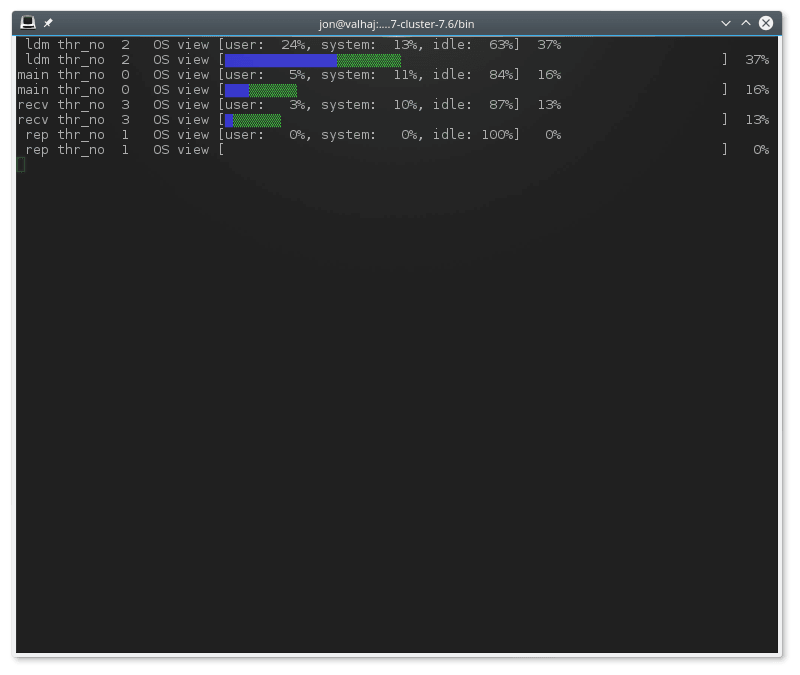
示例输出。 下图显示了 ndb_top 在 Linux 系统的终端窗口中运行,并且在一个中等负载的 ndbmtd 数据节点下运行。这里,该程序使用 ndb_top -n8 -x 调用,以提供文本和图形输出:Sample Output.
The next figure shows ndb_top running in a
terminal window on a Linux system with an
ndbmtd data node under a moderate load.
Here, the program has been invoked using
ndb_top
-n8
-x to provide
both text and graph output:
ndb_top 还显示线程的自旋时间,用绿色显示。ndb_top also shows spin times for threads, displayed in green.